
Category

Tech

Category

Machine learning is not one thing—it is a family of machine learning algorithms, each designed for a specific type of problem. Understanding which algorithm to use, from linear regressions to complex neural networks, is the skill that separates someone who simply runs a tutorial from someone who can actually build a functional, predictive model.

Machine learning algorithms fall into three main learning types: supervised learning (where the model trains on labelled data), unsupervised learning (where it finds patterns without labels), and reinforcement learning (where an agent learns by receiving rewards or penalties). Within those categories sit dozens of specific algorithms – each with strengths, weaknesses, and ideal use cases.

The Three Learning Types Explained

Learning Type How It Works Data Required Common Goal
Supervised Trains on input-output pairs – learns the mapping between them Labelled (X → Y pairs) Predict, classify
Unsupervised Finds patterns or structure in unlabelled data Unlabelled data only Cluster, compress, detect
Reinforcement Agent takes actions, receives rewards, learns optimal policy over time Interaction with environment Optimise decisions

Master Reference Table: ML Algorithms

Algorithm Type Primary Use Case Complexity
Linear Regression Supervised Predicting continuous values (price, temperature) Low
Logistic Regression Supervised Binary classification (spam/not spam, yes/no) Low
Decision Tree Supervised Classification & regression – interpretable results Low-Medium
Random Forest Supervised High-accuracy classification with reduced overfitting Medium
Gradient Boosting (XGBoost) Supervised Tabular data competitions, high-performance classification Medium-High
Support Vector Machine (SVM) Supervised Classification in high-dimensional spaces Medium
K-Nearest Neighbours (KNN) Supervised Simple classification based on proximity Low
Naive Bayes Supervised Text classification, spam detection Low
K-Means Clustering Unsupervised Customer segmentation, grouping similar data Low-Medium
DBSCAN Unsupervised Cluster detection with noise handling, anomaly detection Medium
PCA (Dimensionality Reduction) Unsupervised Feature reduction, visualisation Medium
Autoencoders Unsupervised / Deep Anomaly detection, image compression High
Neural Networks (MLP) Supervised / Deep Complex pattern recognition, flexible task mapping High
Convolutional Neural Network (CNN) Deep Learning Image recognition, computer vision tasks Very High
Recurrent Neural Network (RNN/LSTM) Deep Learning Sequence data – time series, NLP Very High
Q-Learning / DQN Reinforcement Game playing, robotic control, sequential decisions High

Deep Dive: The Algorithms You Will Use Most

Linear and Logistic Regression – These are where almost every ML practitioner starts, and for good reason. Linear regression draws the best-fit line through continuous data. Logistic regression bends that line into a probability curve for classification. Both are fast, interpretable, and often surprisingly competitive against more complex models on clean, well-structured data.

Decision Trees and Random Forests – A decision tree splits data on feature values repeatedly until it reaches a prediction. Intuitive, explainable, and easy to overfit. Random Forests fix the overfitting problem by averaging across many trees trained on random data subsets – one of the most reliable off-the-shelf algorithms for structured/tabular data.

Gradient Boosting (XGBoost, LightGBM, CatBoost) – The dominant family for competitive machine learning on tabular data. These algorithms build trees sequentially, each correcting the errors of the last. Slower to train than Random Forests but typically more accurate. The default choice for most Kaggle competition winners on non-image data.

K-Means Clustering – Divides data into K clusters by minimising the distance between data points and their nearest cluster centre. Fast and scalable, but requires you to specify K in advance and assumes roughly spherical clusters. Works well for customer segmentation and document grouping.

Neural Networks – The foundation of modern deep learning. Multiple layers of connected nodes learn increasingly abstract representations of the input. CNNs are the go-to for images; LSTMs and Transformers for sequential data; standard MLPs for tabular problems where deep learning is warranted.

How to Choose the Right Algorithm

Situation Recommended Starting Point Reason
Predicting a number (regression) Linear Regression → XGBoost Start simple, escalate if needed
Classifying into categories Logistic Regression → Random Forest Interpretable baseline, then power
Finding groups in unlabelled data K-Means → DBSCAN K-Means for clean clusters, DBSCAN handles noise
Image recognition CNN (ResNet, EfficientNet) Convolutional layers extract spatial features
Text / language tasks Transformer (BERT, GPT-based) Attention mechanism handles sequence well
Time series forecasting LSTM or Prophet → Transformers Sequence awareness is critical
Small dataset, need interpretability Decision Tree or Logistic Regression Avoids overfitting with limited data
Tabular data, need high accuracy XGBoost or LightGBM Best-in-class for structured data

Common Mistakes When Picking an Algorithm

  • Jumping to neural networks first – deep learning is powerful but data-hungry and slow to iterate. Start with simpler models.
  • Ignoring data size – some algorithms (SVM, KNN) scale poorly to millions of rows. Choose accordingly.
  • Choosing based on familiarity rather than fit – the algorithm you know best is not always the right one for the problem.
  • Skipping a baseline – always establish a simple model (linear regression, majority-class classifier) before comparing complex ones.
  • Overfitting the algorithm selection to training data – use cross-validation to evaluate on held-out data before declaring a winner.

Time and Space Complexity Reference

Algorithm Train Time Complexity Prediction Time Memory
Linear Regression O(n·d) O(d) Low
Decision Tree O(n·d·log n) O(log n) Low-Medium
Random Forest O(t·n·d·log n) O(t·log n) Medium-High
SVM O(n²) to O(n³) O(n_sv·d) High for large n
K-Means O(n·k·i·d) O(k·d) Low
Neural Network O(epochs·n·layers) O(layers) High

Final Guidance

The algorithm is rarely the bottleneck in a real ML project. Data quality, feature engineering, and proper validation methodology matter more than which specific algorithm you use – especially at the start. Get a working baseline first. Then optimise.

Master linear regression, logistic regression, random forests, and gradient boosting. Understand K-means for clustering. From that foundation, every other algorithm in this list becomes a specialised extension rather than a new concept to learn from scratch.
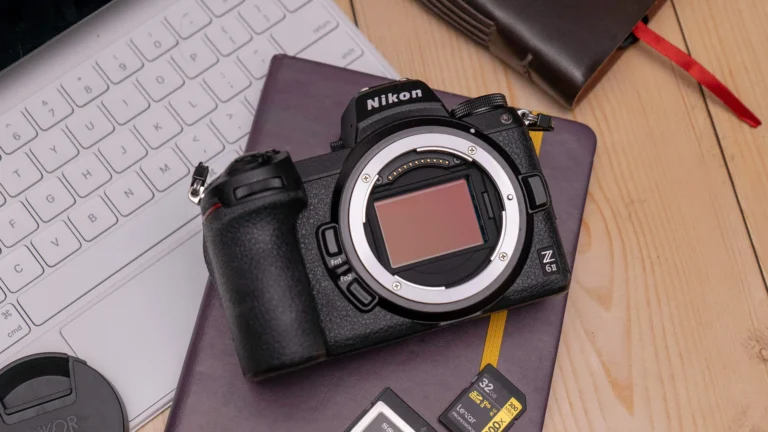

The best budget mirrorless cameras in 2025 sit in a genuinely exciting price bracket. For under $700, you can now acquire a camera with interchangeable lenses and a sensor far superior to any smartphone. The fierce competition between Sony, Fujifilm, Canon, and Nikon in this entry-level segment ensures that buyers get professional-grade image quality without the professional-grade price tag.

The key thing to understand when buying in this range: the body is almost never the limiting factor. The lens you put on it matters more than any spec on the camera itself.

Best Budget Mirrorless Cameras 2025: Full Comparison

Camera Sensor Resolution Video IBIS Price (body) Best For
Sony ZV-E10 II APS-C Exmor CMOS 26MP 4K 30fps uncropped No ~$600 / £550 Content creators, vloggers, beginners wanting top AF
Fujifilm X-S20 APS-C X-Trans CMOS 4 26MP 6.2K / 4K 60fps Yes (5-stop) ~$1,299 → used $800 All-rounder, film simulations, hybrid photo/video
Canon EOS R50 APS-C CMOS 24.2MP 4K 30fps (cropped) No ~$680 / £599 Beginners, family photography, strong Dual Pixel AF
Nikon Z30 APS-C BSI CMOS 20.9MP 4K 30fps No ~$630 / £579 Video-first shooters; no EVF is the trade-off
Sony A6400 APS-C Exmor CMOS 24.2MP 4K 30fps No ~$850 → used $500-$650 Reliable workhorse; best used-market value in APS-C
OM System OM-5 Micro 4/3 20.4MP 4K 30fps Yes (7.5-stop!) ~$999 → used $700 Weather-sealed adventure photography, travel

What to Actually Look For When Buying Budget Mirrorless

Specs are easy to compare. These are the factors that determine what it’s actually like to use the camera:

  • Autofocus system (most important for people/video): Sony’s Eye AF and Canon’s Dual Pixel AF II are the two best systems in this price bracket. If you’re shooting people, the AF system matters more than sensor or megapixels
  • Sensor size: APS-C (all but OM System above) gives better low light and shallower depth of field than Micro 4/3. MFT has the advantage of much smaller, lighter lenses
  • IBIS (In-Body Image Stabilisation): No IBIS is fine for stills with good technique. For handheld video or low-light photography without a tripod, IBIS is a genuine advantage – the OM-5’s 7.5-stop IBIS is exceptional
  • Lens ecosystem: This is the hidden cost. A cheap body in a lens system with expensive or limited glass options will cost you more over time than a slightly more expensive body with better lens selection

The Lens Ecosystem Problem

Buying a mirrorless camera is really buying into a lens system. The body will be replaced in 3-5 years. The lenses can last decades. This should weigh heavily in the purchase decision:

  • Sony E-mount: The largest APS-C mirrorless lens ecosystem. Third-party options from Sigma, Tamron, Viltrox – both native and adapted. Best for long-term flexibility
  • Canon RF-S: Growing fast – Canon has prioritised RF ecosystem heavily. Good native options, but fewer budget third-party choices than Sony
  • Nikon Z: Strong full-frame lens ecosystem that adapts down to APS-C bodies – excellent if you think you’ll eventually move to full-frame Nikon
  • Fujifilm X: Excellent native lens catalogue built over 10+ years. Less third-party support but Fujifilm’s own lenses are excellent – just not cheap
  • Micro 4/3 (OM/Panasonic): Massive legacy lens catalogue. Bodies and lenses are smaller and lighter than APS-C equivalents. Best ecosystem for travel photographers who care about pack weight

Budget Mirrorless by Use Case

Use Case Best Pick Key Reason Trade-off
Learning photography (first camera) Canon EOS R50 or Sony ZV-E10 II Excellent autofocus, beginner-friendly menus, good lens starter kits No IBIS; Canon is slightly more beginner-oriented; Sony has better third-party lenses
YouTube / video content Sony ZV-E10 II or Nikon Z30 Clean 4K, good microphone input, content-creator-focused features ZV-E10 II has no EVF; Z30 has no EVF either – both intended for screen shooting
Travel photography OM System OM-5 (used) Weather sealing + 7.5-stop IBIS in a small body – unmatched for travel Micro 4/3 sensor shows limits in extreme low light vs APS-C
Photo + video hybrid Fujifilm X-S20 (used) 6.2K video, 5-stop IBIS, film simulations, excellent stills – the most versatile in category Full new price is above $700 – hunt used
Best used market value Sony A6400 5-year-old flagship with class-leading AF still – used prices $500-$650 are exceptional value No IBIS; older body design; 4K is slightly overheated with extended use

Buying Used: The Budget Mirrorless Sweet Spot

Camera technology from 3-4 years ago is still exceptional today. The best budget mirrorless camera might be last year’s (or last generation’s) flagship at half the price. Used markets to check:

  • MPB (UK/US/EU): Graded condition system with return policy – the safest used camera buyer
  • KEH Camera (US): Long-established used specialist with conservative grading
  • eBay: Higher variance but lower prices – look for sellers with strong feedback and clear photos of the actual item
  • Facebook Marketplace / local classifieds: Best prices, most risk – inspect in person before payment

Cameras worth hunting specifically: Sony A6400 (used $500-$650), Sony A6600 (IBIS, used $700-$850), Fujifilm X-S10 (predecessor to X-S20, excellent value used), Canon M50 Mark II (older system but good for beginners, under $400 used).

Final Thought

The budget mirrorless market in 2025 is genuinely the best it’s ever been for value. A four-year-old Sony A6400 or a new Canon R50 both produce images that would have been considered professional-grade a decade ago. Buy the body that fits your main use case, invest more in one good lens than you spent on the body, and shoot with it enough to understand its limitations before upgrading anything. The camera is almost never what’s limiting your photography at this level.

If your mobile data feels sluggish in Los Angeles, you’re dealing with one of the most congested wireless markets in the entire country. With over 10 million people in the metro area and massive events like concerts at the Crypto.com Arena or games at SoFi Stadium, the cellular networks here face constant stress.

The frustrating part? The issue often isn’t your phone — it’s where you are and how your carrier manages traffic. Here’s how to diagnose the problem and actually fix slow mobile data in LA.

Why Mobile Data Is Slow in Los Angeles

  • High population density overwhelms cell towers during peak hours
  • Major events temporarily saturate nearby towers
  • Carrier throttling after hitting your data plan limit
  • Network mode settings defaulting to LTE instead of 5G
  • Physical obstructions like tall buildings and underground parking

Quick Fixes for Slow Mobile Data in LA (Try These First)

1. Toggle Airplane Mode On and Off

This forces your phone to reconnect to the nearest tower and often picks a stronger signal. It takes 10 seconds and fixes the problem more often than people realize.

2. Check Your Data Cap

Most carriers throttle speeds dramatically once you hit your plan limit. T-Mobile, Verizon, and AT&T all offer usage dashboards in their apps. If you’ve hit 50GB on a “unlimited” plan, your speeds may be deprioritized.

3. Switch Between 5G and LTE

In some LA neighborhoods, 5G coverage is patchy. If you’re getting weak 5G, manually switching to LTE in your phone’s network settings can actually give you faster, more stable speeds.

4. Clear Your Browser and App Cache

Cached data can cause apps to behave as if they’re loading slowly even when the network is fine. Clear cache in your phone settings under Apps or Storage.

5. Check for Carrier Outages

LA is also prone to outages after extreme weather. Check downdetector.com or your carrier’s official Twitter/X account for real-time status.

Carrier 5G Coverage in LA Throttle Point Best For
T-Mobile Excellent After 50GB Heavy data users
Verizon Good (mmWave downtown) After 50GB Reliability seekers
AT&T Good After 22-50GB iPhone users
Mint Mobile T-Mobile network After plan limit Budget users

Carrier-Specific Fixes for Los Angeles

  • T-Mobile: Enable 5G SA (Standalone) mode if your phone supports it — it’s faster and less congested than NSA 5G
  • Verizon: If you’re downtown on mmWave 5G, try stepping outside or near a window — mmWave doesn’t penetrate buildings well
  • AT&T: Use the AT&T Smart Home Manager app to check for network issues at your specific location

Pro Tips

  • Avoid using mobile data near Staples Center, Dodger Stadium, or Hollywood during events — tower saturation is extreme
  • Use Wi-Fi calling when indoors — many LA buildings have poor penetration, and Wi-Fi calling bypasses the cell tower entirely
  • Consider a signal booster if you work in a basement or high-rise office with consistently poor reception

Common Mistakes to Avoid

  • Blaming your phone when the carrier network is the actual issue
  • Staying on an outdated carrier plan that doesn’t include priority data
  • Not checking whether 5G is actually available at your specific location in LA

FAQs

Which carrier has the best mobile data speed in Los Angeles?

T-Mobile consistently ranks highest in LA for 5G speed and coverage, followed by Verizon for reliability in dense downtown areas.

Why is my 5G so slow in LA?

5G congestion is real. If you’re in a packed area, your 5G signal may be slower than LTE. Try manually switching to LTE in network settings.

Does tower congestion happen in specific LA neighborhoods?

Yes. Hollywood, Downtown LA, Venice Beach on weekends, and areas around stadiums during events are consistently the most congested.

Conclusion

Slow mobile data in Los Angeles usually comes down to network congestion, data caps, or incorrect settings. Start with the simple fixes — airplane mode, data usage check, and network mode toggle. If problems persist, it may be time to switch carriers or upgrade your data plan. In a city this size, your carrier choice genuinely matters.